2023
WD Elements 10 TB Power Usage
I couldn’t find this anywhere else, so I just measured it myself. The WD Elements 10TB in its external enclosure pulls 9.7W when idle, 18W at startup.
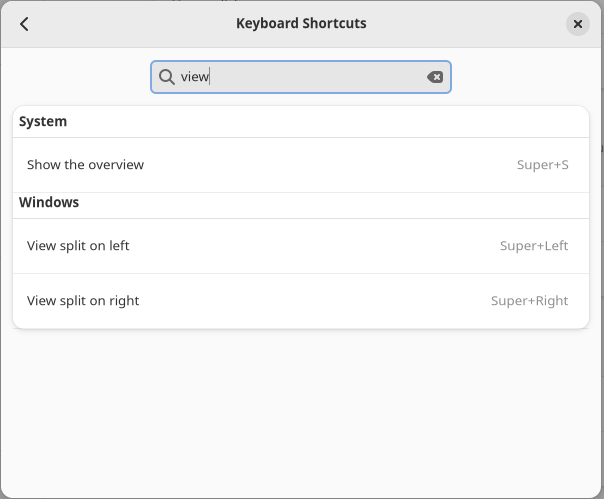
GNOME 43.4 Update Breaking Tiling Shortcuts
I recently updated my GNOME desktop to 43.4 and noticed that my window tiling shortcuts (Super+Left and Super+Right) were broken. It appears that they were reset. To change them back, open the Settings app and navigate to Keyboard Shortcuts. The setting is “View split on left” and “View split on right”.
GitLab Registry Fix: "received unexpected HTTP status: 500 Internal Server Error"
Another GitLab FOSS/CE issue today, this one occurred when pushing a large image (1.5 GB) to my self-hosted GitLab’s container registry. ... 8d54056fe8e1: Retrying in 6 seconds 8d54056fe8e1: Retrying in 5 seconds 8d54056fe8e1: Retrying in 4 seconds 8d54056fe8e1: Retrying in 3 seconds 8d54056fe8e1: Retrying in 2 seconds 8d54056fe8e1: Retrying in 1 second received unexpected HTTP status: 500 Internal Server Error The key factor here is my GitLab registry domain (registry.quinncasey.com) is behind a Cloudflare proxied CNAME. Fix This seems to have occurred because Cloudflare limits HTTP POST requests to 100MB for freeloaders like me. However even capital E Enterprise users only get 500MB, which also would have triggered this issue. Turn off Cloudflare proxy for your registry domain. If, like me, you use a wildcard for all subdomains (*.quinncasey.com), add another CNAME record for just the registry and toggle off the cloud icon. There might be another way around this without exposing your IP but I haven’t found it yet and this works just fine.
Hook execution failed: Failed to open TCP connection to 172.31.0.2:443
I got this error today in GitLab FOSS/CE running in docker compose when testing a webhook. This solution helped me, specifically removing the hostname: from the compose config. version: '3.6' services: web: image: 'gitlab/gitlab-ce:latest' restart: unless-stopped # hostname: 'git.quinncasey.com' environment: ... This might break things cascading down from this one config option, but time will tell.
2022
systemd_exporter for user services
I was researching how to monitor systemd services using Grafana/Prometheus when I came across this article. I learned systemd monitoring comes pre-loaded with node_exporter and just needs to be enabled. Then I discovered the Ansible role I use already enables it for me. Neat! No work to do. Or so I thought. Punching node_systemd_unit_state{instance="192.168.1.8:9100"} into Prometheus did not show user services, units that would be shown by systemctl --user. Turns out node_exporter only collects for root. systemd monitoring for USER services I found the community collector systemd_exporter which has this capability, although it isn’t documented anywhere. It’s a completely different binary than node_exporter, and thus has to be installed and enabled. Follow the install instructions or use the cloudalchemy/ansible-systemd-exporter Ansible role. The role starts another root systemd exporter, which is not what we’re interested in. After installing the binary, set up yet-one-more systemd service in ~/.config/systemd/user/systemd_exporter.service which runs the same collector at a user level with some changes: Add --collector.user argument. Change the metrics port (I use 9559). Remove the User= and Group= lines from the [Service]. It should look something like this: ~/.config/systemd/user/systemd_exporter # # Ansible managed # [Unit] Description=Prometheus SystemD Exporter After=network-online.target [Service] Type=simple ExecStart=/usr/local/bin/systemd_exporter \ --collector.user \ --web.listen-address=0.0.0.0:9559 SyslogIdentifier=systemd_exporter Restart=always RestartSec=1 StartLimitInterval=0 [Install] WantedBy=multi-user.target For completeness, this is my install-systemd_exporter.yml ansible playbook: - hosts: all become: true roles: - cloudalchemy.systemd_exporter - hosts: all tasks: - name: Copy user systemd_exporter.service ansible.builtin.copy: src: ../../templates/systemd/systemd_exporter.service dest: ~/.config/systemd/user/systemd_exporter.service - name: Enable systemd_exporter.service ansible.builtin.systemd: daemon-reload: true enabled: true state: started name: systemd_exporter scope: user After running the playbook, or otherwise --user enable --now-ing systemd_exporter, I now have metrics on 0.0.0.0:9559 describing user services. Neat.
Change Modification Time of Exported iCloud Videos
Exported Video on Macs do not include any EXIF data. Here's how to fix that.
Removing a dead NFS share of an exported ZFS dataset
I recently exported a Zpool without first removing the corresponding sharenfs option. On the next reboot, exportfs attempted to share this directory from a pool which is no longer mounted (as it doesn't exist anymore).
Reducing Docker image size with distroless containers
I recently read this great article about docker image size, how it works, and why it matters. Up until now I hadn’t given any thought to the size of the containers I’m building. Dive is the cli tool I’m using to inspect each layer of the final docker container. I gave these quick changes a try, and am pretty astonished by the results: Before My Fetch Image Proxy project was the most recent offender so I started there. I was using FROM node:17 without any build step. This meant that npm libraries, and the overhead of a debian base was weighing the container to 1 GB in space! After Switching to a build step had the biggest impact, but using gcr.io/distroless/nodejs:16 distroless images for the runtime also made a slight difference. Both small changes combined brought the overall size to 124 MB, about an 8x reduction in disk space. I probably should have known this so far into my career with docker, but if I did I would not have had this fun tooling experience. This is the gcr template for nodejs: https://github.com/GoogleContainerTools/distroless/blob/main/examples/nodejs/Dockerfile
2021
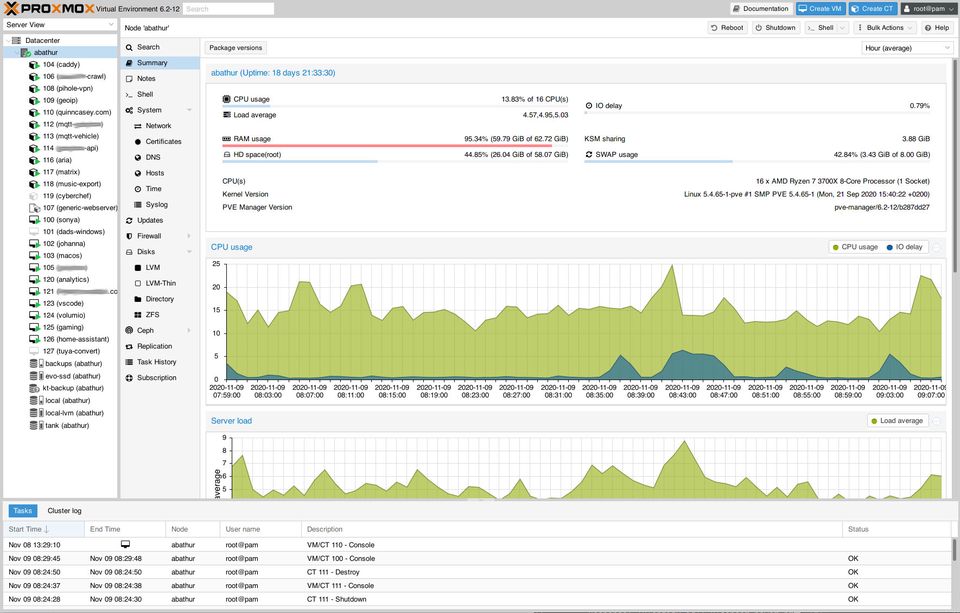
Homelab
I try to self-host the software and services I use on a daily basis.
2020
macOS Big Sur on Proxmox with OpenCore
Generate boot image from here: https://github.com/kholia/OSX-KVM With this as a guide for proxmox: https://manjaro.site/how-to-install-macos-big-sur-on-proxmox-ve/ GenSMBIOS, ProperTree, Hackintool are REQUIRED! Post Install Use Clover Configurator to mount EFI disk of root and OpenCore install disk. Copy OpenCore install disk EFI files to root efi. Open config.plist into GenSMBIOS, use the settings there. Use Hackintool to check that en0 is built-in. If not, use ProperTree to edit the plist as described here FIXME NSKeyedArchiver Notes